The Trackers Are One Machine
Nine tracking methods sounds like nine problems to solve one at a time. They are inputs to a single engine whose only job is to decide that all of them are you, and in 2026 that engine moved to where your blockers cannot see it
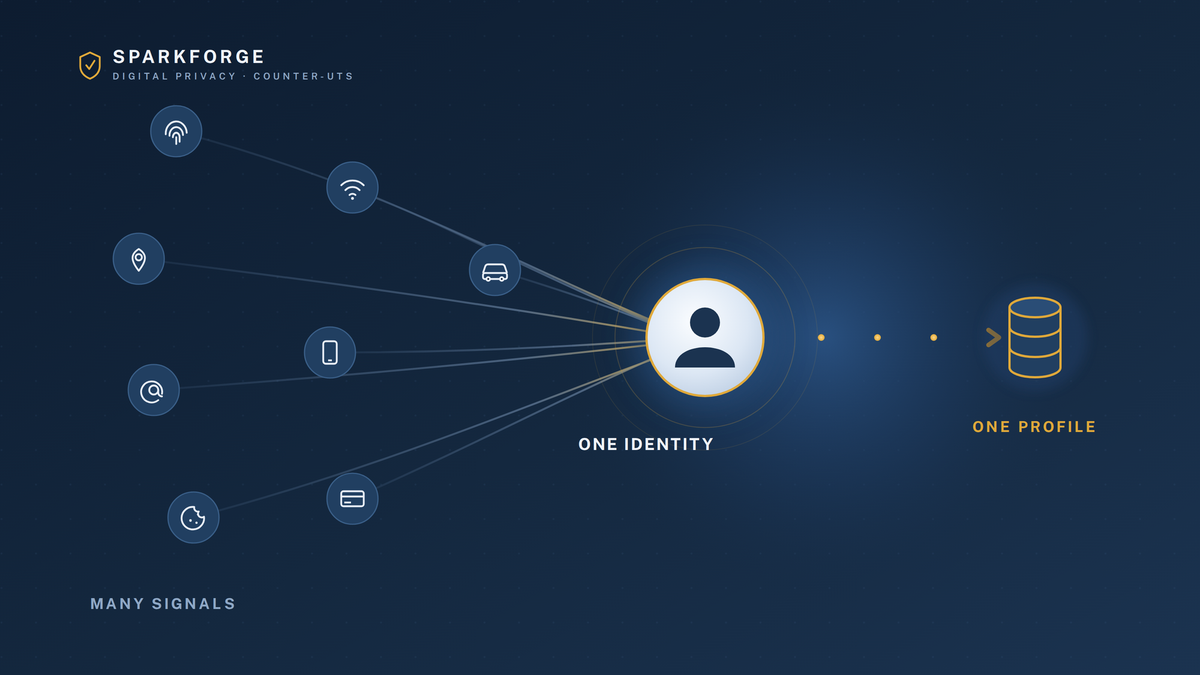
Most privacy advice treats tracking as a list. Cookies here, fingerprinting there, a data broker over there, each with its own switch to flip. Work down the list, flip every switch, and the watching stops. It is a comforting way to think about it, because a list has an end. The trouble is that the list was never the thing tracking you. Behind the nine techniques sits one machine, and its job is not to record any single thing you do. Its job is to look at a thousand scattered signals and decide that all of them belong to the same person. It is an identity-resolution engine, and it is built to keep working even after you defeat several of its inputs, because it only needs enough of them to be sure the person is you.
THE CORE IDEATracking is not a set of separate techniques watching separate things. It is one engine performing one task: resolving many identifiers down to a single, persistent you. Cookies, fingerprints, ad IDs, and email hashes are just inputs. Block one and the engine leans on the others. This is why flipping switches one at a time feels like work and changes so little, and why the only defense that matters is starving the engine of inputs it cannot replace.
The cookie panic is over, and that is the bad news
Anyone who read about privacy in 2022 or 2023 was told the same story: the third-party cookie was dying, Google was killing it in Chrome, and a cookieless future was arriving. That future was cancelled. In July 2024 Google reversed the phase-out, in April 2025 it dropped even the planned prompt that would have let users opt out, and in October 2025 it retired the entire Privacy Sandbox project, Topics API and all. Third-party cookies are still on by default in Chrome in 2026, which is roughly two of every three browsers on earth.
At almost the same time, Google reversed itself in the other direction. Since February 16, 2025, its own ad policies permit advertisers to use device fingerprinting, the practice Google itself called wrong and said "subverts user choice" back in 2019. The UK's data-protection regulator called the reversal irresponsible and noted the obvious problem: fingerprinting is far harder for an ordinary person to see or control than a cookie ever was.
Read those two reversals together and the real shift becomes clear. The browser stopped being the battleground. The industry spent years bracing for a world without cookies, built machinery that does not depend on them, and then kept the cookies anyway. That machinery is where your identity actually gets resolved now, and almost none of it lives in the browser where your ad blocker sits.
What actually dominates now
The old list of nine put cookies and beacons first because, in 2024, that is where the money was. The order is wrong for 2026. Here is the machine's real hierarchy, worst first.
Your apps auction your location to strangers. Every time an app shows an ad, it broadcasts a bid request to potentially thousands of ad-tech firms, inviting them to bid on the impression. That request can carry your precise GPS location, your mobile advertising ID, your IP, and your device details. Brokers simply listen to this "bidstream" and keep the data, including from auctions they lose. This is not a fringe theory. In January 2025 the broker Gravy Analytics was breached, spilling location records tied to thousands of ordinary apps, and analysis showed the data came from the bidstream rather than from any code the app makers knowingly installed. Games, dating apps, fitness and prayer apps were all leaking their users' movements through the ad auction without realizing it. The Federal Trade Commission spent 2024 and 2025 bringing the first cases restricting this, against Mobilewalla and against Gravy and its subsidiary Venntel, the latter of which sold Americans' location to immigration and law-enforcement agencies. This is the Skripal lesson made ordinary: there is a cheap, purchasable version of your movements, and you did not agree to sell it.
Collection moved to servers you cannot block. The single most important structural change is the quietest. Sites increasingly collect data not in your browser but on their own servers, through techniques called server-side tagging and conversions APIs. The tracking request goes to a subdomain of the site you are already visiting, looks like ordinary first-party traffic, and never touches the block lists your ad blocker relies on. A browser extension cannot block a request the browser never sees. This is why client-side blockers, the backbone of privacy advice for a decade, do less every year.
The new cookie is your email address. With cookies staying but browsers like Safari and Firefox blocking them, the industry built a replacement that does not depend on the browser at all: your hashed email. When you log in somewhere, your email is scrambled into a portable token, such as Unified ID 2.0 or LiveRamp's RampID, and passed through the ad system. Because it is derived from something you typed rather than a file in your browser, clearing cookies does nothing to it, and it follows you across sites, apps, and even your television. This is the practical reason your email address has become an identity key rather than a contact detail.
Identity graphs stitch the rest together. Companies like LiveRamp and Acxiom maintain graphs that link a person's many identifiers, emails, phone numbers, device IDs, home address, into one persistent profile. Some of the linking is deterministic, from verified logins, and some is probabilistic, inferred from shared networks and behavior. This graph is the engine's memory. It is what lets a fingerprint captured today attach to an email you gave a store last year.
The browser-level inputs, demoted but not gone
Fingerprinting builds a near-unique signature from your screen size, fonts, graphics hardware, and dozens of other traits, and it survives clearing cookies precisely because there is nothing to clear. Now that Google permits it, expect more of it, though independent proof of a sudden surge is still thin, and Apple pushed back by adding default fingerprinting protection to its own software in 2025. Cookies and web beacons still do their old job of following you between sites, but they are now the least of the machine's inputs rather than the most. And CNAME cloaking hides a third-party tracker behind a subdomain of the site you trust, using a DNS trick so the request looks first-party and slips past extension-based blockers. What these three share is that they are the inputs a well-set-up device can still meaningfully cut, which is exactly why they get the most attention and deserve some of the least worry.
The inputs people forget
Your phone carries a resettable advertising ID that ties your app activity together, and while Apple's App Tracking Transparency lets you refuse it and most people do, the SDKs buried in apps keep collecting plenty besides. And the newest frontier is the hardware you would never think of as a tracker. In January 2026 the FTC settled with General Motors and OnStar over collecting precise location and driving behavior from millions of cars and selling it to data brokers and insurers. Smart televisions use automatic content recognition to sample what is on your screen, including from devices plugged into them, and ship it off by default. The machine has outgrown the web.
WHAT BROWSER HYGIENE STILL BUYS YOUGood browser setup is not pointless. A hardened browser, a content blocker, and encrypted DNS genuinely cut the cookie, beacon, and CNAME-cloaked layer, block a large share of casual profiling, and stop the easiest tracking cold. For a low-risk person who simply does not want to be followed around the open web, this remains worth doing and takes an afternoon.
WHAT IT NO LONGER BUYS YOUIt does almost nothing against the inputs that now dominate. Clearing cookies does not touch the hashed-email ID tied to your logins. An ad blocker cannot see server-side collection or a bid request your phone broadcasts to an ad exchange. Browser settings do not reach the SDK in your apps, the graph LiveRamp keeps, or the telemetry your car and television send. The machine deliberately moved to where the browser cannot look, so a browser-only defense now guards the least important door.
Two moves that starve the machine today
Because the inputs that matter most are off the browser, the highest-value defenses are too. These two take about ten minutes together, cover your whole device rather than one browser, and hit the bidstream and the network layer directly.
Kill your advertising ID. This is the identifier that ties your app activity together and rides along in bid requests. Turning it off starves both the SDK layer and the bidstream at once.
- iPhone (verified on iOS 18, September 2026): Settings, then Privacy & Security, then Tracking, and turn off "Allow Apps to Request to Track." Then back in Privacy & Security, open Apple Advertising and turn off "Personalized Ads."
- Android (verified on Android 15, September 2026): Settings, then Security & privacy, then Privacy, then Ads, and choose "Delete advertising ID." On some phones the path is Settings, then Privacy, then Ads.
Put a blocking resolver in front of your whole device. Encrypted DNS pointed at a filtering resolver blocks many trackers, including CNAME-cloaked ones, at the network layer before any browser is involved, and it covers every app on the device, not just your web browsing.
- iPhone and Android: install a configurable encrypted-DNS resolver such as NextDNS or Quad9 and enable it as the system-wide private DNS. On Android the setting is Settings, then Network & internet, then Private DNS. On iPhone the resolver's own app installs a profile that switches it on.
- This is the short version. The full cross-platform walkthrough, including desktop and router-level setup, is its own SparkForge guide.
IF YOU'RE A HIGHER-RISK TARGETAssume your movement history is already purchasable, because for anyone the bidstream reaches it effectively is, and government agencies buy exactly this data rather than seeking a warrant. Two moves on a phone are not enough. Reduce what the device emits in the first place: minimize installed apps, deny location to everything that does not strictly need it, keep the advertising ID dead, and for a genuinely sensitive posture move to a hardened phone and a separate identity rather than retrofitting your daily one. Then attack the stored profile directly by removing yourself from the brokers and freezing the files, because starving new inputs does nothing about the dossier already built.
Verified and limited
The reversals described here were checked against primary sources in September 2026: Google's own Privacy Sandbox announcements for the cookie decision and the October 2025 wind-down, Google's ad-policy change and the UK Information Commissioner's response for the fingerprinting reversal, and the FTC's own case materials for the bidstream actions against Mobilewalla and Gravy Analytics and Venntel and for the 2026 order against GM and OnStar. The device menu paths were verified on current iOS and Android in September 2026, and vendors move menus, so if a path is off by a step, search the settings screen for the bolded term. Two honest limits beyond those already noted. Turning off an advertising ID and filtering DNS reduces what the machine can collect going forward, it does not recall what has already been sold or delete the profile a graph already holds. And no browser or phone setting defends against malware on the device itself. This piece explains the machine; the step-by-step defenses live in the SparkForge how-to guides it links to.
What to actually do
Do the two moves above today, because they are quick and they hit the inputs that matter most. Then work the rest in order of payoff, not in order of how much you have heard about it. Remove yourself from the data brokers and freeze your files, so the graph has less to sell. Harden the browser and set encrypted DNS everywhere, which cleans up the layer browser hygiene can still reach. And if you are not sure which of these matters most for your particular life, that is exactly the question the SparkForge Threat Model Planner exists to answer: it turns this machine into a short, ordered, personal list of what to do first. The full walkthroughs for each step live in the SparkForge how-to guides.
THE ONE-LINE LESSONYou cannot block a machine one input at a time when its whole design is to route around the input you blocked. Stop flipping switches on the web and start starving the engine where it actually feeds: your phone, your logins, and the profile already built about you.
THE MINDSET SHIFTStop picturing trackers as a row of separate spies you can shake off one by one. Picture one engine trying to prove that a hundred scattered signals are the same person, and ask, of anything you are about to do, whether it hands that engine another input it can keep. The goal is not a browser that blocks everything. It is a life that emits less for the machine to resolve.