
Who Can Actually Read Your Cloud Backup
A phone hardened to the point of pain, backing up to a service that holds a compellable key, has moved the target rather than removed it. Who holds the key, ecosystem by ecosystem.
Some people will spend a weekend on their threat model. Lockdown Mode on, app permissions audited one by one, SMS abandoned, a twelve-character passcode typed forty times a day. Real work, real benefits.
Then the phone backs up overnight to a service that holds the key to it all.
The gap persists because the marketing language around cloud storage is built to close the conversation rather than open it. Every major provider encrypts your data in transit and at rest. True across Apple, Google, Meta, and Signal, and useless for making any decision.
THE CORE IDEA. "Is it encrypted" is not a security question, because the answer is always yes. The security question is "who holds a key that can be compelled". Encryption at rest with a provider held key means the provider can decrypt your data on request. Encryption at rest with a key only your devices hold means they cannot. Two completely different products, sold with the same word.
Apple states the mechanism plainly. Under standard iCloud protection, "the encryption keys from your trusted devices are secured in Apple data centers, so Apple can decrypt your data on your behalf whenever you need it." Written as a convenience feature, and useful as one. Read as a security property, it says a key exists, Apple holds it, and whoever can compel Apple reaches your data without touching your hardened device.
iCloud without Advanced Data Protection
The default for most iPhone users, and the configuration most likely to undermine a hardened device.
Even by default, Apple lists fifteen categories as end-to-end encrypted regardless of settings: Passwords and Keychain, Health data, Journal data, Home data, Messages in iCloud, Payment information, Apple Card transactions, Maps, QuickType keyboard learned vocabulary, Safari, Screen Time, Siri information, Wi-Fi passwords, W1 and H1 Bluetooth keys, and Memoji.
What sits outside it is the part that matters: iCloud Backup, iCloud Drive, Photos, Notes, Reminders, Safari bookmarks, Shortcuts, Voice Memos, Wallet passes and Freeform. Apple holds the keys to all of these unless you act, and its law enforcement guidelines state that "iCloud content, as it exists in the customer's account, may be provided in response to a search warrant issued upon a showing of probable cause, or customer consent."
An iCloud Backup is a copy of the device. It includes photos, app databases, message history, and call logs. If your posture rests on the device being hard to reach, and a copy sits behind a key Apple holds, you have moved the target somewhere your passcode does not defend.
iCloud with Advanced Data Protection turned on
ADP is Apple's answer to this problem, and a genuine one. From Apple's platform security documentation: "When a user turns on Advanced Data Protection, their trusted devices retain sole access to the encryption keys for the majority of their iCloud data." It extends end-to-end encryption to ten further categories: iCloud Backup, including device and Messages backup, plus iCloud Drive, Photos, Notes, Reminders, Safari bookmarks, Shortcuts, Voice Memos, Wallet passes, and Freeform. Apple's law enforcement guidelines confirm the consequence, stating that with ADP enabled, Apple "cannot decrypt certain iCloud content, including Photos, iCloud Drive, Backup, Notes, and Safari Bookmarks", and that "Apple does not receive or retain encryption keys for customers' end-to-end encrypted data."
Now the part most coverage skips. Three categories are never end-to-end encrypted, even with ADP fully on.
iCloud Mail. Apple states it "does not use end-to-end encryption because of the need to interoperate with the global email system." Unavoidable, and your mail is reachable regardless of your ADP setting.
Contacts and Calendars. Apple states these "are built on industry standards (CalDAV and CardDAV) that do not provide built-in support for end-to-end encryption." For many investigative purposes, your social graph and movements over time are more valuable than message content. ADP covers neither.
Limits exist inside the covered categories too. Apple states that "iWork collaboration, the Shared Albums feature in Photos, and sharing content with 'anyone with the link,' don't support Advanced Data Protection", so "the shared content is not end-to-end encrypted even when Advanced Data Protection is enabled." Most other sharing, including iCloud Shared Photo Library, iCloud Drive shared folders and shared Notes, stays encrypted. Enabling ADP also disables web access at iCloud.com by default.
Requirements: two-factor authentication, a device passcode, and a recovery contact or recovery key. Every device on the account must run at least iOS or iPadOS 16.2, macOS 13.1, watchOS 9.2, tvOS 16.2, HomePod 16.0 or iCloud for Windows 14.1. Managed and child accounts are ineligible. On iPhone: Settings, your name, iCloud, Advanced Data Protection. On Mac: System Settings, your name, iCloud, Advanced Data Protection, Turn On. One device enables it account-wide.
Two caveats. An Apple support note, last updated 22 September 2025, states it "can no longer offer Advanced Data Protection in the United Kingdom to new users", and that existing UK users "will be given a period of time to disable the feature themselves." That has been subject to ongoing legal dispute and may have changed, so check Apple's page for your region rather than any secondary account, including this one. Separately, Apple's own pages disagree on totals, fifteen rising to twenty-five on the support page against fourteen rising to twenty-three in the Platform Security guide. Work from the category lists.
iMessage and Messages in iCloud
This is where technically careful people are most often wrong, because two accurate statements combine into a false conclusion.
The first: iMessage is end-to-end encrypted. Apple's law enforcement guidelines state that "iMessage communications are end-to-end encrypted and Apple has no way to decrypt iMessage data when it is in transit between devices." Second, Messages in iCloud is end-to-end encrypted by default, one of the fifteen always-protected categories.
The conclusion people draw is that their message history is out of reach. It is not, and Apple says why: "When iCloud Backup is enabled, the keys to your backups are secured in Apple data centers. If you use both iCloud Backup and Messages in iCloud, your backup includes a copy of the Messages in iCloud encryption key to help you recover your data."
The Messages key is end-to-end encrypted. The backup containing a copy of that key is not, unless ADP is on. The archive is reachable through the backup rather than through Messages in iCloud, and the encryption on the messages themselves is intact and irrelevant. With ADP on, everything inside the backup is end-to-end encrypted "including the Messages in iCloud encryption key", and the chain closes. Apple also notes that turning off iCloud Backup means "a new key is generated on your device to protect future Messages in iCloud."
A second issue is more stubborn. Your messages also live on the other person's device, inside their backup.
KEY TAKEAWAY. End to end encryption of a message says nothing about the custody of that message six hours later. A conversation is only as protected as the least protected backup among its participants, and you do not control the other end.
Google account and Android backup
Google's position is mixed, and the split runs through the middle of a single backup.
Google states that in an Android backup, "Some of your data is end-to-end encrypted with your device's screen lock PIN, pattern, or password." That covers app data, call history, contacts, device settings, and SMS and MMS messages, a real guarantee tied to a secret Google does not hold.
The exclusion is stated just as plainly: "Photos and videos in Google Photos, and MMS media received from your carrier aren't encrypted by your device's screen lock." Google Photos is not end-to-end encrypted, and no setting makes it so. Neither is Google Drive. Google's information requests policy states that law enforcement can "get a search warrant to compel disclosure of the content of communications, such as email messages, documents, and photos." For most people, the photo library is the highest-value target in the account: location, faces, documents, screenshots.
Messaging adds a subtlety. Google Messages supports end-to-end encrypted RCS, but Google notes that "when end-to-end encrypted messages are received on your phone, they're also included in Android backup." Message text there is covered by screen lock encryption, so transport encryption doesn't protect the archive. The screen lock is. If that lock is a four-digit PIN, that is the strength of the protection on your whole message history. Google has described hardware-backed rate limiting against guesses at that key, but the technical documentation was not reachable at the time of writing.
WhatsApp message transport is end-to-end encrypted by default. WhatsApp backups are not, until you turn it on.
WhatsApp introduced encrypted backups as "an extra, optional layer of security to protect backups stored on Google Drive or iCloud with end-to-end encryption." Optional is the operative word. Left alone, a backup lands in Drive or iCloud in a form the cloud provider can read, so the ecosystem answers above apply to your full chat history.
Turned on, the design is strong. The backup is "secured by a password or a 64-digit encryption key", and WhatsApp's security whitepaper states that "the password is unknown to WhatsApp, the user's mobile device cloud partners, or any third party." The password route runs through a hardware security module vault using the OPAQUE protocol, so the password never reaches WhatsApp's servers. The stated result: "only the user and nobody else, including Apple, Google, Facebook, or WhatsApp, is able to access a user's backed-up messages." On iPhone, there is a bonus, since WhatsApp notes that once the feature is on, "your WhatsApp chat history will be excluded from the device backups."
The trade is real. You can change the password only if you still hold the old password or the key. Lose both and the archive is gone.
Signal
Signal is the outlier, because it started from the position the others are retrofitting. It does not hold your message content on its servers. Its standing response to legal demands is that it can produce only "the date and time a user registered with Signal and the last date of a user's connectivity to the Signal service", and that it does not have "messages, calls, profile information, group information, contacts, stories, call logs, and many other kinds of content and metadata." Signal's framing: "we cannot share data in response to valid legal requests that we never had in the first place."
Signal Secure Backups keeps that property. It is opt-in, protected by a 64-character recovery key. Signal states that "your recovery key is always in your hands; it never leaves your device and is never shared with Signal's servers", and that "without your unique recovery key, no one (including Signal) can read, decrypt, or restore any of the data in your Secure Backup Archive." The free tier covers all text messages and the most recent 45 days of media, with a paid tier at 1.99 US dollars per month raising media storage to 100 gigabytes. View once and soon-to-disappear messages are excluded. Local passphrase-encrypted backups and device transfers remain available.
The failure mode matches WhatsApp's. Signal states "there is simply no way to decrypt the information that it contains without your recovery key." Store the key like it is the account.
Side by side
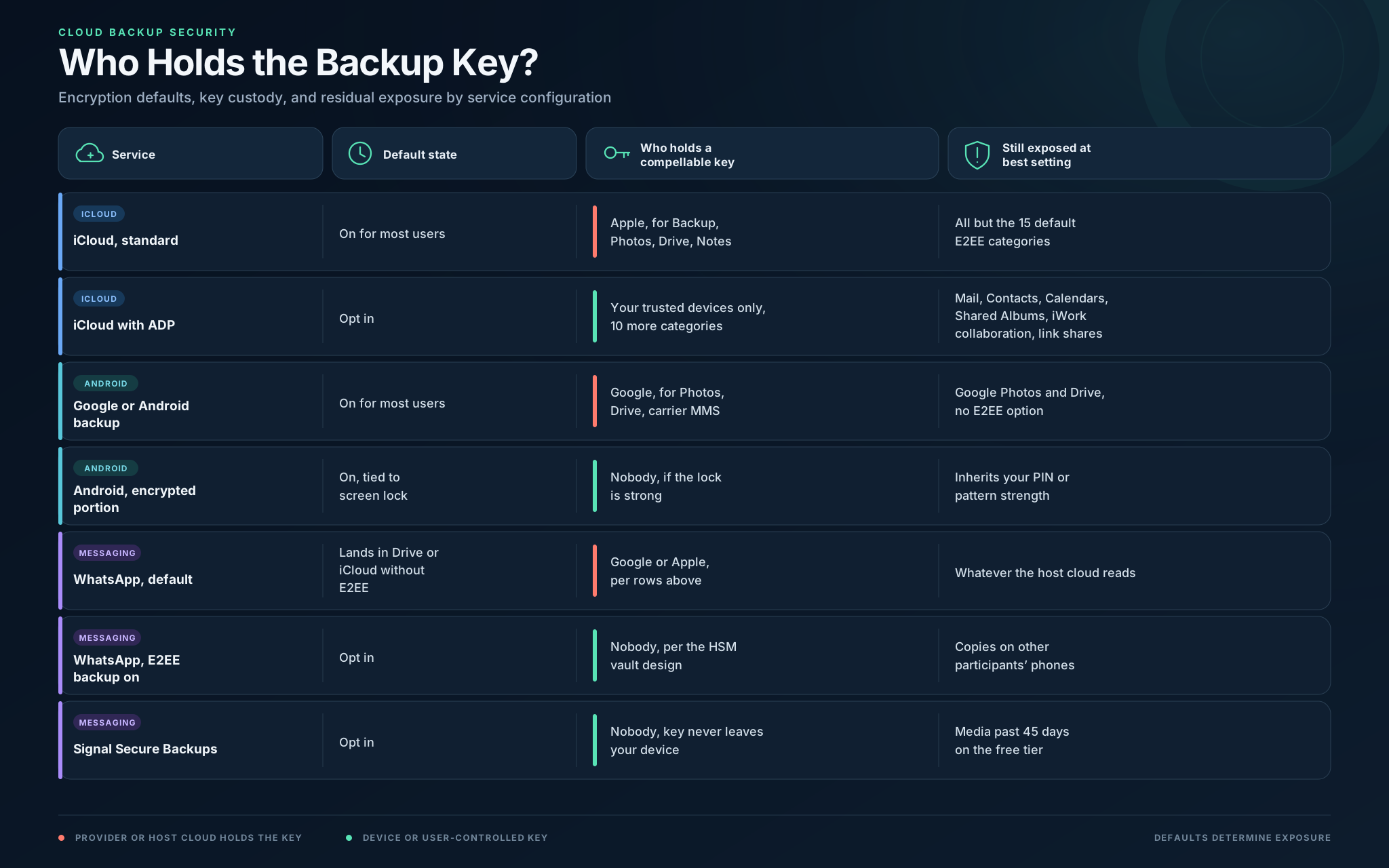
What to actually do with this
The honest counterweight to a device hardening guide, including the ones SparkForge publishes: hardening the endpoint raises the cost of one attack path and does nothing to the other. A device backing up nightly to a service that holds a key moves the target rather than removing it. Nobody needs to defeat your passcode if the copy is easier to ask for.
The highest value single change in each ecosystem:
iPhone. Turn on Advanced Data Protection. Nothing else changes this much for this little effort. Then accept that Mail, Contacts and Calendars sit outside it, and decide whether that content belongs in iCloud at all.
Android. Google Photos is not covered. Either accept it as reachable, or move the sensitive part of the library to storage where you hold the key. Then make the screen lock a real passphrase, since it is the root of the encrypted portion.
WhatsApp. Turn on end-to-end encrypted backup, and choose the 64-digit key over a password if you can store it properly. Until you do, your history is governed by whichever cloud it lands in.
Signal. If you use Secure Backups, treat the recovery key as your most sensitive credential. If you do not, a lost phone means a lost archive, by design.
None of it closes the last gap. Every conversation also exists on someone else's device, under someone else's settings.
THE MINDSET SHIFT. Stop asking whether a service is encrypted and start drawing the key custody diagram. For every place your data rests, name the party that holds a key and ask what it would take to make them use it. If the answer is a document, that is your real attack surface, and no amount of work on the device changes it.
Sources
- Apple, iCloud data security overview: https://support.apple.com/en-us/102651
- Apple, How to turn on Advanced Data Protection for iCloud: https://support.apple.com/en-us/108756
- Apple, Advanced Data Protection in the United Kingdom: https://support.apple.com/en-us/122234
- Apple Platform Security, iCloud data security overview: https://support.apple.com/guide/security/icloud-data-security-overview-sec973254c5f/web
- Apple, Legal Process Guidelines, US Law Enforcement: https://www.apple.com/legal/privacy/law-enforcement-guidelines-us.pdf
- Google, Back up or restore data on your Android device: https://support.google.com/android/answer/2819582
- Google, End-to-end encryption in Google Messages: https://support.google.com/messages/answer/10262381
- Google, How Google handles government requests for user information: https://policies.google.com/terms/information-requests
- WhatsApp, About end-to-end encrypted backup: https://faq.whatsapp.com/490592613091019
- WhatsApp, Security of End-to-End Encrypted Backups whitepaper: https://www.whatsapp.com/security/WhatsApp_Security_Encrypted_Backups_Whitepaper.pdf
- WhatsApp, End-to-end encrypted backups on WhatsApp: https://blog.whatsapp.com/end-to-end-encrypted-backups-on-whatsapp
- Signal, Signal Secure Backups: https://support.signal.org/hc/en-us/articles/9708267671322-Signal-Secure-Backups
- Signal, Backups and Device Transfers on Signal: https://support.signal.org/hc/en-us/articles/10074659364122-Backups-and-Device-Transfers-on-Signal
- Signal, Government requests: https://signal.org/bigbrother/